
How to Repair any Bricked / Half Dead Huawei Modem and Mobile WiFi’s

How to Repair any Bricked / Half Dead Huawei Modem and Mobile WiFi’s ?
1. Download the Huawei Flasher 1.6 By Fr3nsis tool from above link and run it.
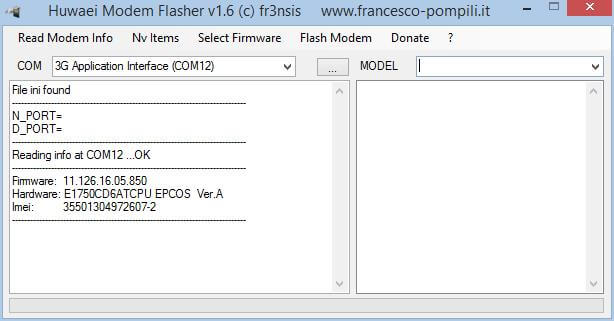
2. Connect the Huawei’s MiFi / data-card in PC with USB cable.
3. Click “Read Modem info”. It should automatically select the COM port.
4. If it is Hilink modem / MiFi routers and does not comes with COM port, then you need to enable it, before getting detected by Huawei Flasher software.
5. If it is correctly detected then download the compatible firmware according to the model from any sources.
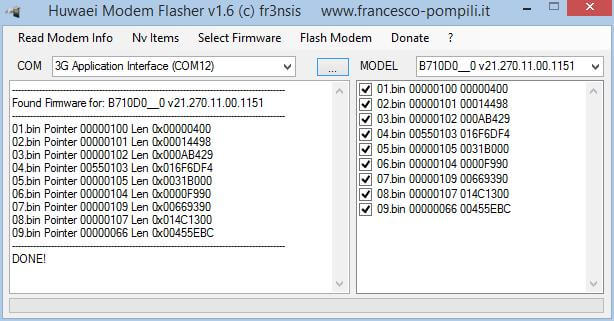
6. Click Select Firmware – Extract from EXE from menu, and choose the file from PC.
7. It will ask you browse the folder, choose any folder from desktop and click on OK.
8. It will extract the firmware in different parts in that folder and it will select that automatically.
Email us at info@techlanka,lk
You can repair bricked Huawei E3231 Hilink Dongle, bricked Vodafone R215 (Huawei E5372) as well as half dead E3276 dongle with the help of firmware update. This post is different from others, which will help you to repair all half dead / bricked Huawei MiFi’s as well as Huawei normal / hilink modems. In this repairing solution, we are going to take the help of Huawei Flasher 1.6
How to Repair any Bricked / Half Dead Huawei Modem and Mobile WiFi’s ?
1. Download the Huawei Flasher 1.6 By Fr3nsis tool from above link and run it.
2. Connect the Huawei’s MiFi / data-card in PC with USB cable.
3. Click “Read Modem info”. It should automatically select the COM port.
4. If it is Hilink modem / MiFi routers and does not comes with COM port, then you need to enable it, before getting detected by Huawei Flasher software.
5. If it is correctly detected then download the compatible firmware according to the model from any sources.
6. Click Select Firmware – Extract from EXE from menu, and choose the file from PC.
7. It will ask you browse the folder, choose any folder from desktop and click on OK.
8. It will extract the firmware in different parts in that folder and it will select that automatically.
Email us at info@techlanka,lk


Post a Comment